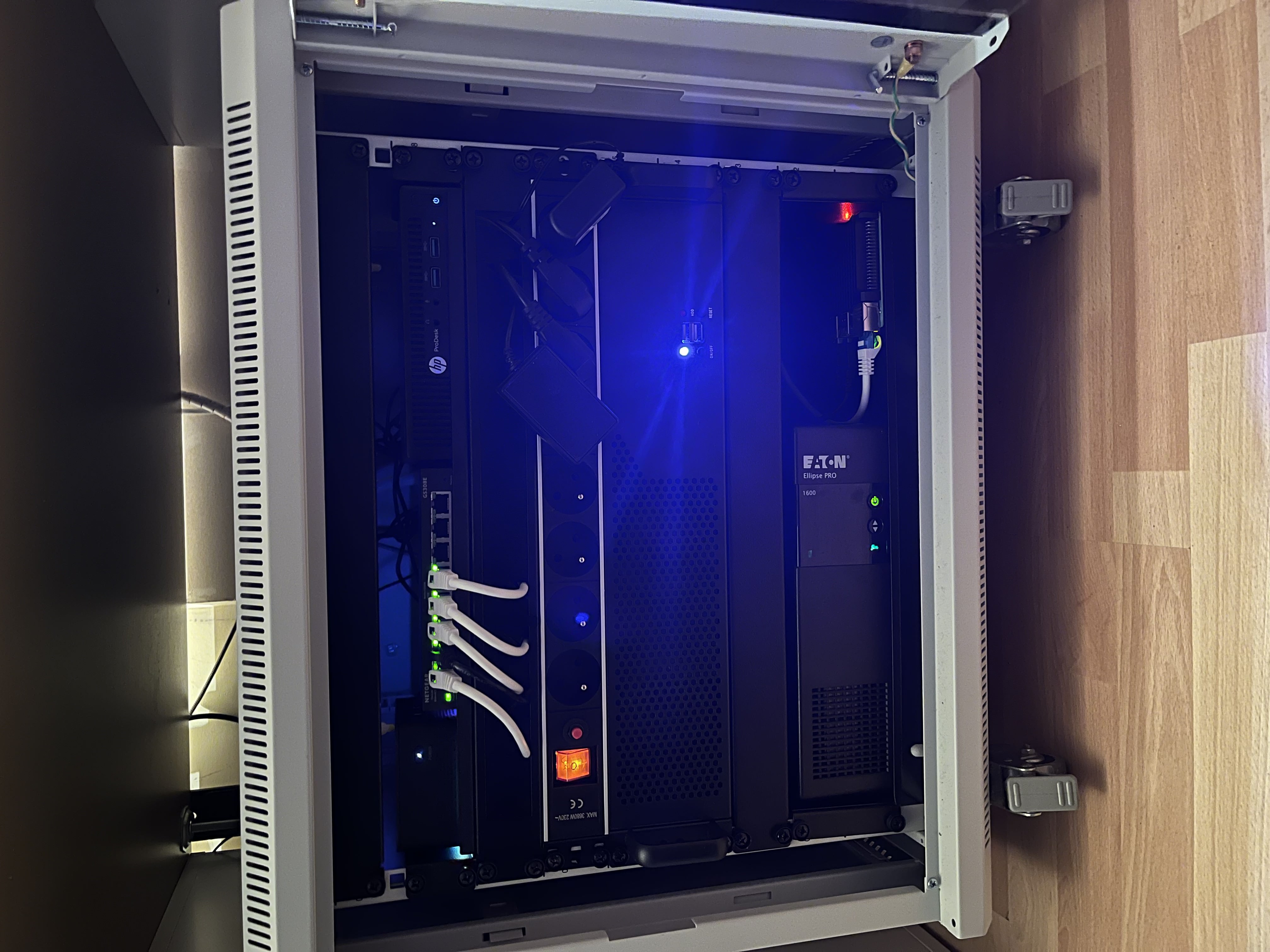
NercLab: My Homelab Environment
A robust homelabbing environment built from the ground up, designed for tinkering, automation, and secure data management.
Introduction
My homelab, dubbed NercLab, is more than just a server; it’s a sandbox where I bridge the gap between theory and practice. I carefully selected and built the hardware with a focus on energy efficiency without compromising on performance.
Everything you see here—from the network architecture to the container orchestration—has been self-configured to provide a professional testing ground for my studies in Computer Science.
Infrastructure & Services
The heart of NercLab is managed through Portainer, hosting a wide array of Dockerized services that handle everything from daily utility to complex security labs.
- Dashboarding: I use Homarr as my central command center. Het biedt een real-time overzicht van de status van al mijn containers en snelle toegang tot elke service.
- Data & Backups: I run TrueNAS for bulk data storage and provide automated backup solutions for both my own and my parents’ Macbooks.
- Media & Photos: Immich serves as my high-performance self-hosted photo engine, while Jellyfin manages my media library.
- Security & Privacy: Vaultwarden acts as my central password manager, and I use Nginx Proxy Manager for secure reverse proxying and SSL certificate management.
- Automation: Home Assistant is the brain of my home automation, integrating various smart devices into a single interface.
Networking & Connectivity
A lab is only as good as its network. I’ve implemented a professional-grade network stack:
- Routing: A dedicated router running pfSense handles my VLAN traffic and firewalls, complemented by a Netgear switch and a access point flashed with FreshTomato firmware for more control.
- VPN: I use Twingate for Site-to-Site VPN connectivity, allowing even my outdated devices to securely access lab services from anywhere.
- Monitoring: Using Nutify for UPS/power monitoring and dedicated dashboards to keep an eye on system health and uptime.
Learning & Cybersecurity
NercLab is also my training ground for cybersecurity. I run Virtual Machines as hacking/testing boxes to sharpen my offensive and defensive skills in a controlled environment. To ensure nothing is lost during these tests, I utilize Proxmox Backup Server (PBS) for rapid recovery.
Used Technologies
- Hypervisor: Proxmox VE
- Storage: TrueNAS, PBS
- Network: pfSense, FreshTomato, Nginx
- Containers: Docker & Portainer
- Dashboard: Homarr, Nutify
- Security: Twingate, Vaultwarden